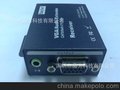
HDMIover Ethernet
MODEL:PW-DT102
Operating Instructions

Dear Customer
Thank you for purchasing this product. For optimum performance and safety, please read these instructions carefully before connecting, operating or adjusting this product. Please keep this manual for future reference.
FEATURES
lCompliantHDCP.
lFlexible and scalable HDMI 1080p High Quality Video Broadcasting with Gigabit Ethernet LAN.
lExtends 1080p HDMI signals up to120m overa singleUTP Cat5e/6 cable.
lMulticasting and broadcasting architecture, adding more displays without adding LAN bandwidth loading.
lSupport Point-to-Point, Point-to-Many and Many-to-Many network configuration.
lDual power input: 802.3af compliant PoE & DC5V.
lUp to8transmitters and more than 200 receivers possible in a single system.
lWith IR Control function ,it allows you control back the source at the end of destination
lBuilt-in DIP switch to change Group ID and Utility for remotely
lSupport IGMP v.1 &v.2 address
lSupport cascading Ethernet Switches up to 3 layers.
NOTICE
Our company reserve the right to make changes in the hardware, packaging and any accompanying documentation without prior written notice.
TABLE OF CONTENTS
Specifications
Package Contents
Panel Descriptions
Connecting and Operating
Typical Application
Maintenance
Product Service
Warranty
SPECIFICATIONS
Operating Temperature Range | -5 to +35℃(+23to +95℉) |
Operating Humidity Range | 5 to 90%RH (No Condensation) |
Support Video Format | DTV/HDTV:480i/576i/480P/576P/720P/1080i/1080P |
Output Video | HDMI,HDCP |
Audio Sampling rate | 32kHz, 44.1kHz and 48kHz |
Transmission Distance | 1080P@60Hz120m(Maximum) oversingleCAT5E/6 /24AWG/Solid |
Power consumption | 5V/1A DC , 802.3af PoE Power consumption: Max. 8W |
Dimension (L×W×H) | L94xW93.5x24.6mm |
IR frequencyrange | 38-56kHz |
Net Weight | Receiver:255g,Transmitter:255g |
TX&RX | Default IP address:192.168.168.55;MAC address:00:0b:78:00:60:01 Default IP address:192.168.168.56;MAC address:00:0b:78:00:60:02 |
Note1: Specifications are subject to change without notice. Mass and dimensions are approximate.
Note2:one TX to many RX or manyTXconnect tomany RX,IP and MAC addressmust be different.
PACKING CONTENTS
1)Main Unit. Transmitter & Receiver HDMI Extender
2)Power adapter DC 5V 1Ax2PCS
3)IR-TX cable&IR-RX cable
4)Operating Instructions
PANEL DESCRIPTIONS
Transmitter Panel

①Indicator of power input②Status of signal connection③HDMI input
④IR-TX port⑤Resetbutton⑥Power input port⑦Ethernet port⑧DIP switch
4 bits DIP Switch:
1~4for 0~15 (group) ID selection (such as 0000,0001,0010 etc,)
Default Tx unicast IP address is 192.168.168.55 and can be configured from webpage.
Tx Group IP address: 239.168.168.1x, where x is the value of bits[3:0]
Receiver Panel
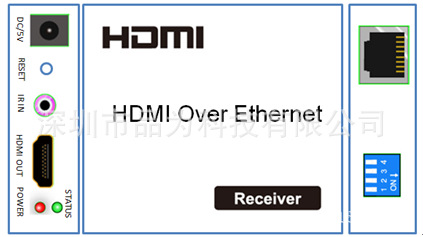
①Indicator of power input②Status of signal connection③HDMI Output
④IR-RX port⑤Resetbutton⑥Power input port⑦Ethernet port⑧DIP switch
4 bits DIP Switch:
1~4for 0~15 (group) ID selection (such as 0000,0001,0010 etc,)
Default Tx unicast IP address is 192.168.168.55 and can be configured from webpage.
Tx Group IP address: 239.168.168.1x, where x is the value of bits[3:0]
User should configure the DIP switch within 10 seconds, firmware should reset the system 20 second after detecting the first change of DIP switch, and latch the new DIP switch value after reset.
How to Connect HDMI Over IP One source to one display function
1. Connect one HDMI Cable between the HDMI output port of source device and the HDMI input port of Transmitter unit
2. Connect one HDMI Cable between the HDMI input port of display and the HDMI output port of Receiver unit.
3. Connect one UTP Cat5e or better cables between the RJ45 port of Transmitter unit and RJ45 port of Receiver unit.
4. Connect the included 5V DC power supplies to both Transmitter unit and Receiver unit.
5. Power on the output device first and the source second.
1) One to One
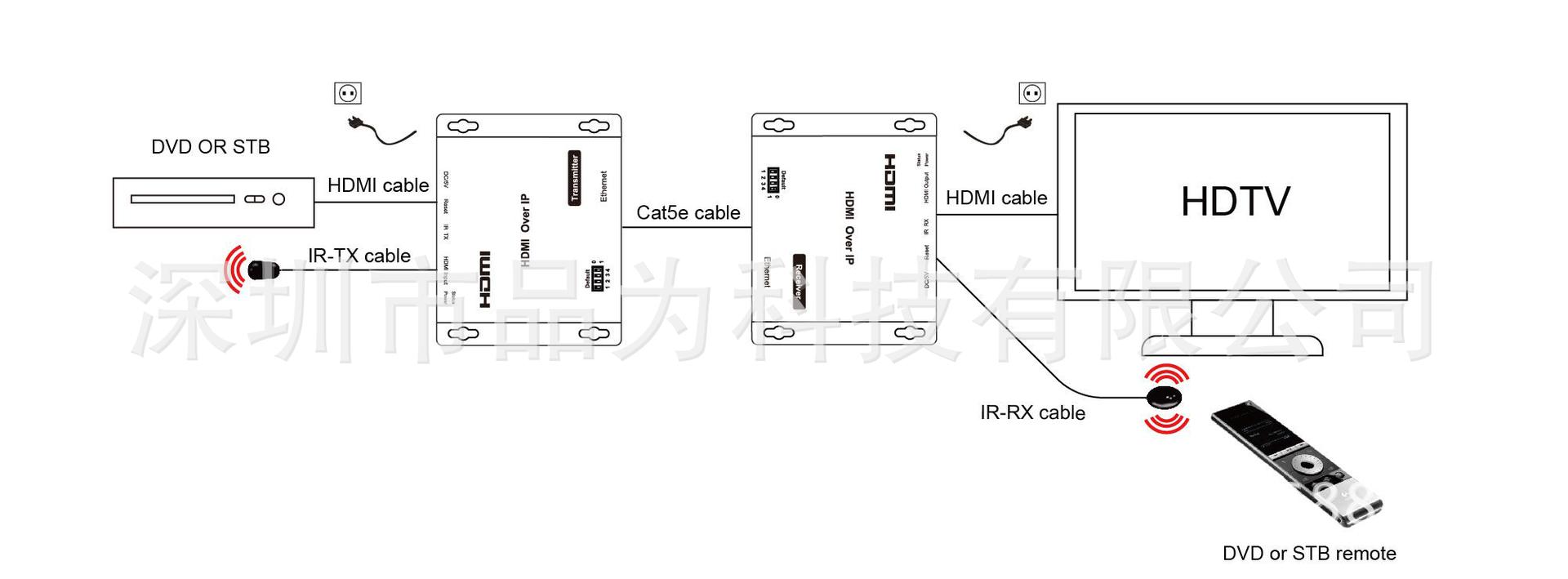
Transmitter Receiver
How to Connect HDMI Over IP One source to many display function
1.Connect one HDMI Cable between the HDMI output port of source device and the HDMI input port of Transmitter unit
2.Connect one CAT5e or better cable between the RJ45 port of transmitter and input port of Gigabit Ethernet switch hub.
3. Connect one CAT5e or better cable between the output port of each Gigabit Ethernet switch hub and RJ45 port of Receiver unit.
5. Power on the output device first and then the source device.
6. Use dip switch has set up on the transmitter side (Group ID:0001) for each receiver. (Group ID:0001)

How to Connect HDMI Over IP more source to more display function
Many Sources to Many Displays Function
1. Connect one HDMI Cable between the HDMI output port of source device and the HDMI input port of Transmitter unit.
2. Connect one HDMI Cable between the HDMI input port of display and the HDMI output port of Receiver unit.
3. Connect one CAT5e or better cable between the RJ45 of each Transmitter unit and RJ45 port of Gigabit Ethernet switch hub.
4. Connect one CAT5e or better cable between each RJ45 port of Gigabit Ethernet switch hub to RJ45 port of Receiver unit. User can select source channel by setting up dip switch on each transmitter unit. And select display source for Receiver units via one remote control.
5. Use DIP switch select change sources .

MAINTENANCE
Clean this unit with a soft, dry cloth. Never use alcohol, paint thinner of benzine to clean this unit.
PRODUCT SERVICE
1)Damage requiring service:The unit should be serviced by qualified service personnel if:
(a)The DC power supply cord or AC adaptor has been damaged;
(b)Objects or liquids have gotten into the unit;
(c)The unit has been exposed to rain;
(d)The unit does not operate normally or exhibits a marked change in performance;
(e)The unit has been dropped or the cabinet damaged.
2)Servicing Personnel:Do not attempt to service the unit beyond that described in these operating instructions. Refer all other servicing to authorized servicing personnel.
3)Replacement parts:When parts need replacing ensure the servicer uses parts specified by the manufacturer or parts that have the same characteristics as the original parts. Unauthorized substitutes may result in fire, electric shock, or other hazards.
4)Safety check:After repairs or service, ask the servicer to perform safety checks to confirm that the unit is in proper working condition.